
 By
By Many of you will have read my previous two tutorials on inserting comments into an iWeb blog that isn’t hosted with a MobileMe account and thank you to those people who sent me favourable e-mails on them. Haloscan, the people who gave us the orignal code for adding the comments to the site have been taken over by a company called JS-Kit and they in turn have made the process for adding comments to your iWeb blog different. In this tutorial I explain the new method of inserting comments into your non-MobileMe blog.In my previous tutorials we had to start by visiting Haloscan’s site and signing up for an account. That is no longer the case. All of the account management is now done after the code has been inserted into to your site.
I must point however, if you did follow my original tutorials and therefore have a Haloscan account, that will still work as the ‘Comments’ administrator.
So let’s crack on. To begin with you will have to pop over to the JS-Kit web-site to get the code (or you can copy it from below).
Open iWeb and once you have finished the blog entry scroll to the bottom of the page and insert a small text box; in it enter the word ‘comment’ without the quotation marks.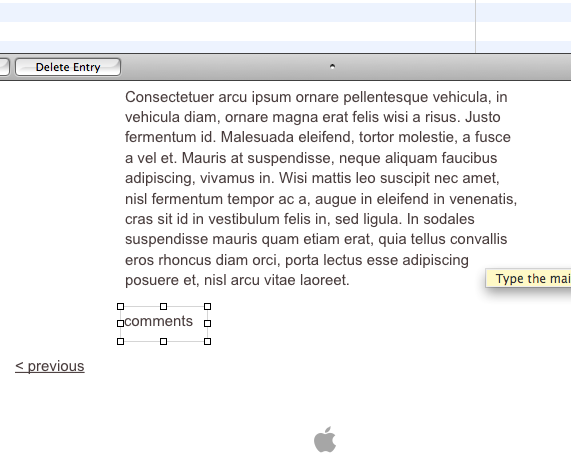
Save your site and publish it to a folder.
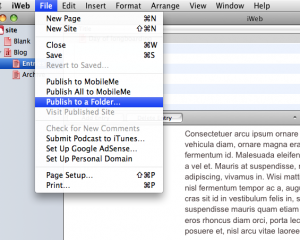
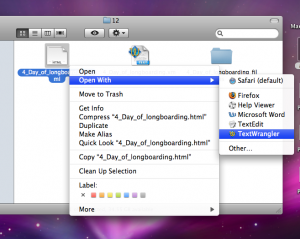
Open Finder and navigate to the folder where you saved your web-site. There will be 2 files/folders. One called index.html, and a folder called Site. Open the folder and then the folder called Blog. Next open the folder called Entries, followed by the year and month folders corresponding to the blog entry. Find the html file for your blog entry and open it in a HTML editor such as TextWrangler (or something similar).
Search (cmd + F) for the word ‘Comment’. After one or 2 clicks you should find a div containing the word (see the image).
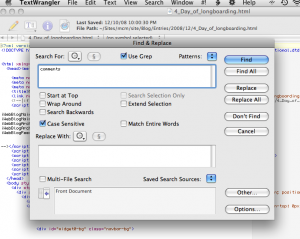
Select the entire div and delete it.
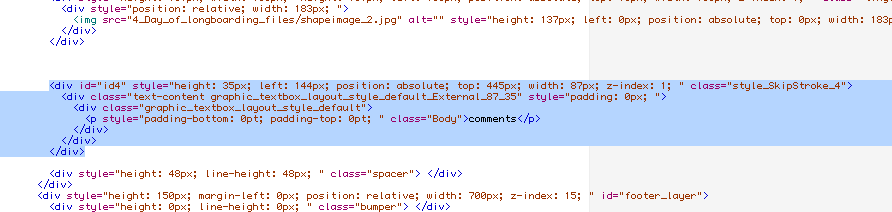
Paste the code below into the space where the HTML was previously and then save your page.
<div class="js-kit-comments" permalink=""></div>
<script src="http://js-kit.com/comments.js"></script>
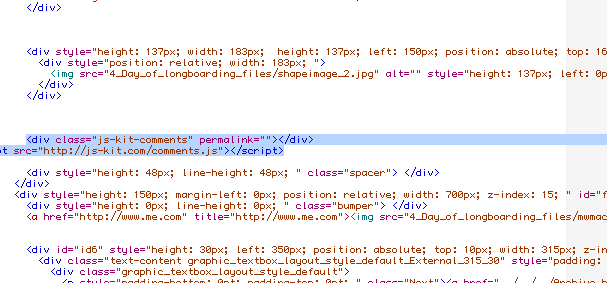
Job done. Publish your site as normal.
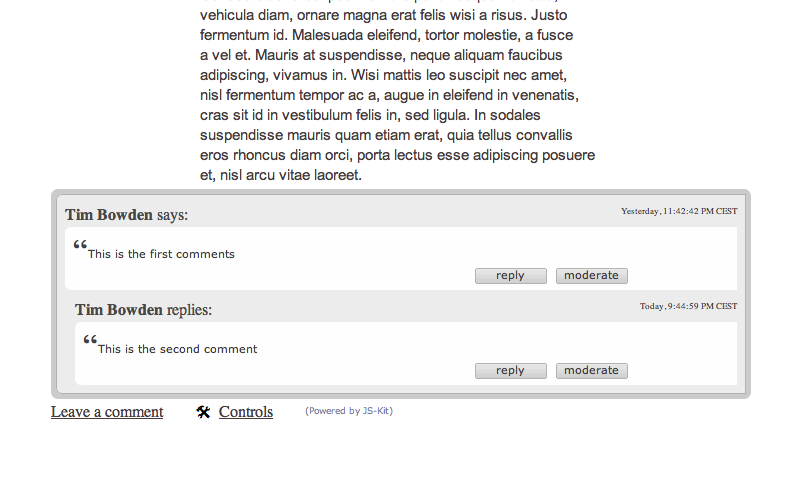
As you can see from the image above, the comments will take the full width of the page as set in ‘Inspector’. If your blog entry is narrower you will get a blog entry like it is above. To counteract this effect, make sure you widen your blog entry.
The obvious solution (you may think) would be to insert the code into a HTML Snippet or in place of the word ‘Comment’ in the HTML code. I tried this before coming up with this solution and found that the container for the comments would not increase in length after a certain number of comments had be entered.
In a future post I plan to show you how to customize how your comments look on your page.




 Loading ...

This looks like such a PITA. Do you think iweb ’09 with a built in FTP client, will preserve the ability to comment on non-MobileMe hosted Blogs?
Karl,
I agree with you, it is a bit of a pain. I think there is a possibility that the ability to do this will remain as iWeb 09 will only publish changed web pages. Whether it will detect changes made outside of iWeb and then overwrite the pages on the non MobileMe server remains to be seen.
I do have visions of me having to have a iWeb 08 and iWeb 09 sections in the future.
Tim
Thank you so much! You are a star! I have been searching and searching for how to add comments to my new site, as i don’t have an .Mac account it’s been so hard. Then i stumbled across your amazing site and it told me exactly what to do in very easy steps. 🙂
Hi there!
when I try to open the html page where I want comments with textwrangler or textedit, it does not show the codes but the page as on the internet with my pictures… so I can’t change codes…
May you help me please if you understand me..
Oh ok! I found where I made a mistake. If it happens to one of you, you just have to tick “ignore RTF command” when you open the file.
I’ve found one solution (and I’m still working on it)… for “The obvious solution (you may think) would be to insert the code into a HTML Snippet or in place of the word ‘Comment’ in the HTML code. I tried this before coming up with this solution and found that the container for the comments would not increase in length after a certain number of comments had be entered.”
Create an HTML widget on your page and enter the following HTML
This will create an iFrame that scrolls when there’s enough text in it and is about the width of the page and leaves a little room for the scroll bar. 400px in height is just right for their entry form.
Then, i created a file called that i called “js-kitInclude.html” which has the js-kit standard 2 lines in it
The unfortunate thing about this solution so far is that you have to copy this file into the folder where the “files” are that iWeb builds for each blog entry. I tried putting it at the root, but js-kit then thinks comments for one page of the blog belong to each and every page so there’s no uniqueness to the comments – you have to put the file in each and every blog files section. This is the one thing i want to fix and haven’t figured out yet.
PlanetMitch,
Indeed thanks for your help. I did think about including an iFrame but didn’t really like the scrolling when too many comments appeared. I can’t believe there is an easier solution (perhaps there is and we haven’t found it yet) to this comments problem.
oh, here’s a page where you can see it in use – my test page
http://planet5d.dyndns.org/~wikiuser/planet5d/Planet5d_Blog/Entries/2008/8/29_Catching_up.html
and one more thing – i couldn’t find the ‘comments’ section in my html files in iWeb09 – so the solution posted above may not be correct any more.
planetMitch – thanks for the idea about embedding an iframe in the html widget.
I have been looking for something like this for ages.
It looks like this site filters out html so the actual code never appeared 🙁
but I managed to pick it up from : http://planet5d.dyndns.org/~wikiuser/planet5d/Planet5d_Blog/Entries/2008/8/29_Catching_up_files/widget4_markup.html
(To others – you just need the iframe tag)
To avoid having to copy the include file you create into every directory … If you just put a forward slash / before js-kitInclude.html as your iframe src, then it should work with a single file in the root of your site.
Sorry – post above was wrong. The forward slash alone was not enough. It also needs some javascript to make js-kit recognise different blog posts.
I’ve posted the code onto my blog : http://www.willis-owen.co.uk/Blog/Entries/2009/2/2_Adding_comments_to_iWeb_without_MobileMe.html
Richard,
Thanks for the advice. Just so you know, your blog doesn’t show up at all in IE6 or IE7. I tried viewing your link at work and I know something is there as I can see the black Dot where your nav-bar should be.
I’ll take a look on my Macbook later when I get on the train.
Tim
I could have been uploading a new version of the site just about then?
I just tried in IE7 running in Fusion and it seemed OK.
is iLife ’09 worth getting with the iweb updates? i don’t even know much on the differences.
Hi I used this method and it works but what i’m wondering is, if u look at the result of the page you will see the comments people leav e and a leave me link. But if you look at your website (allaboutiweb.com) you will see a whole leave a reply with name and mail and website and a box for the comment. i like that more, it makes it easier for people to see the comment part and comment`. i hope what im saying makes sense.let me know and please visit my site
dare2review.com
Hello again I also wondered how do you add “add comment” at the top of your blog (besise the subscribe) ? I dont have that how do you do that?
Thank you
Is there a way to change the font of the “Leave a comment”?
Thank you for this genius solution for getting my comments to work in my blog!! GREAT HELP!
Was just wondering, if I happen to update my html page of my blog and also change the code as mentioned above to get the comments working, do I lose al the previous blog comments that were posted there previously?
thanks
George.
How do you center this?
THANK YOU!!!! Looking forward to that customization tutorial you’ve teased us with!
I used your technique and thought I had it licked! But no. When I get too man comments, I run out of room on a page. Now what?
I was just wondering what the consensus on iWeb 09 is, does this same setup work? I’m just starting out with my site, but it looks like yours will prove a treasure trove of info. Thanks.
There is a better way, make a HTML widget and enter this code:
hr
div style=” width:700px; height:750px; overflow:auto;”
div class=”js-kit-comments” permalink=””
/div
script src=”http://js-kit.com/comments.js”
/script
/div
You need to add the brackets 😛
I tried adding the comments with iTweak and it came up saying “replace text”. Like Rob, I then attempted using an html snippet then publishing and uploading my site and it worked right away!
Okay, I’m dying here. I’ve tried everything and I can’t get it to work. I tried Richard’s method, and all it does is show the text from the js-kitinclude.html file. What am I doing wrong?
John,
What is the URL of your page where you want the comments to work on. If you post the link I can take a look at the code for you.
Tim
All About iWeb’s method was working well until I went to “publish as normal.” When I publish, iWeb is publishing the page I have saved that just says “comments,” not the page that has been saved on my local folder. The file on my local folder looks great & has the nice JS-kit comments section! What step am I missing here at the end? I have iWeb ’09. Thank you!
-Meredith
Meredith,
Thanks for your comment. It depends on where your site is published. If you are publishing to mobileme then you will have to copy/paste your web-site through Finder and your iDisk. If you are publishing to your own host then you will have to use a separate FTP application. As you make the changes to you iWeb site outside of the iWeb application the internal iWeb FTP application won’t register the changes you have made. Give Cyberduck a try. It is easy to use and FREE!!!
I Hope that helps,
Tim
I have a problem: The comments are there (in my site) but I cannot change the size automatically (comments can’t be seen well because when you post the size of the widget changes but you can’t see part of it). Is there a way to make the page flexible or what do I have to do?
OK so I didn’t read the whole thing. Now I get that I couldn’t just copy paste the code into the HTML Snippet. So, what do I do if I’m using FTP? I read in a comment something about “Cyberduck”. What is that and how does it work?
Gabriel,
Thanks for your comment. Cyberduck is a free FTP application that can upload your iWeb site up to your webspace. You don’t need it if you use MobileMe. Thanks to it’s more advanced features you are able to individually publish pages rather than the whole web-site every time.
I Hope that helps,
Tim
Thanks for helping, but now I have another problem. How do I make scroll bars to post my comments? I also want to know how can I upload the website using your way of adding the comments without publishing to a folder and without MobileMe?
Hey guys, I need help! I’m also trying to put the comments and it seems to work fine. However, when I refresh the page, all comments disappear. Does anyone know how to fix this?
Anyone here try Wufoo to make their comments box? http://www.wufoo.com. You can see its design capabiliies in this video. http://www.youtube.com/watch?v=x-OPuBvCHLA&feature=related
The only thing not mentioned is how to publish the site (e.g., to a folder first,then to the FTP server) after having added the comment box(es). I’ve got a LOT of old blog entries I want to add comment boxes to.
Tim, is there a way to use Automator to do any of this?
I tried following the instructions only to find out that with IWeb09, there’s no such thing as “Publishing to a Folder”. All you have is “Publish Entire Site” and “Publish Site Changes”. I’ve published my site on FTP and not on ME, so can’t add comments to my blogs. How can you help?
Aileen, in iWeb 09 there is the option to publish to a folder. I do it all the time. Are you looking in the right place? You have to click on the ‘site name’ in the list on the left hand side of iWeb. This will open up the publishing window where the iWeb pages normally appear on the right. You then use the drop-down menu towards the top (I’m writing this from memory now so I can’t be exact) but the window says something like ‘Publish to:’ and then defaults to MobileMe.
If you published your site through FTP in iWeb then it is the drop-down menu you used to select FTP rather than MobileMe.
I hope that helps,
Tim
Thanks Tim. I forgot all about it. Your website is very useful and when I first published our site, had technical difficulties so went to a local Mac distributor here in Manila, Philippines and asked for help. Told the technicians there about “allaboutiweb” and how useful it is, and now they’re also learning from your site. i’ve applied a few tricks here and there and they really work. will give you feedback if i’m successful about adding comments.
It seems the instructions don’t work with IWeb’09. Tried several times, but doesn’t work. Tried even downloading Chatterbox (very easy, create html snippet and just paste the code) but doesn’t look good and the number of comment lines are limited according to the size of the text box you create.
Tim, care to share with me what service you use for your blogs(posts) for this site? Did you use the iweb blog with mobileme or third-party blogging service?
My problem is that I’m publishing to a third-party server (GoDaddy). I tried what you described, Tim, by publishing to a folder, but because my site publishes to GoDaddy, I don’t know how to get it to work.
I tried WuFoo before and got comments to show, but the comments went back to the account and didn’t show up on the blog.
p.s. When publishing an iWeb site WITH MobileMe (as opposed to without)…the secret is to NOT make the text box. Instead you must put the text to be replaced at the bottom of your blog post and WITHIN that same default text box. This way the page will continue to expand as more posters post comments. Otherwise (with a separate text box, as mentioned above), your comments will run out of room and no longer work.
Do you think it would be possible for you to create a post on styling the comments box to fit in with your iWeb webpage?
How do you center this? Can you tell me please?