
 By
By This tutorial has been turned into a video. I highly recommend everyone watch the video to better visualize how adding a Facebook Like button to your iWeb website works.
I have been meaning to do this tutorial for quite a while now but never got round to it. I am sure once you find out how easy it is to do you will be amazed that you didn’t try it sooner.
Unless you have been living in a cave somewhere in the middle of nowhere for the last 8 years you will know that Facebook is the second most popular web-site on the face of the planet after Google. With that sort of pulling power it seems almost ridiculous not to include a Facebook ‘Like’ button on your web-site.
So how do we go about adding a button to our iWeb sites? Simple! To begin with you will need to point your browser in the direction of the Facebook Developers page regarding Social Plugins.
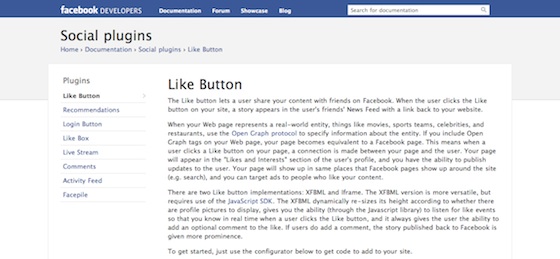
Once there, scroll down a bit and you will see a long gray rectangle containing various elements that you will have to complete and an example of how your button will look.
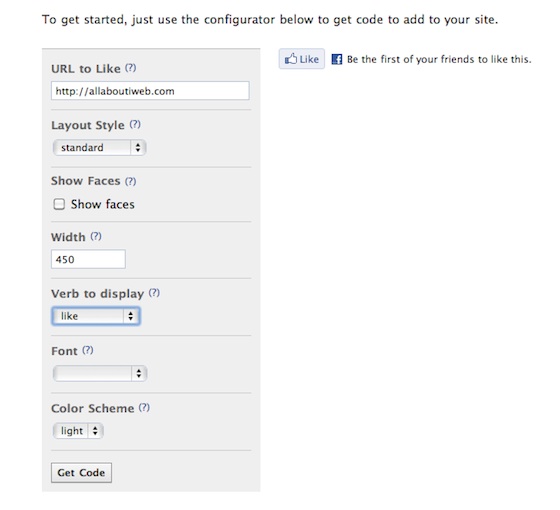
Fill in the relevant boxes, starting with the page URL you want to add the button to. You can of course just add your site’s URL and only get the code once, else you will have to get the code for every page you add the button to.
Next choice to make is which layout you want for your button. There are three to choose from, Standard, Button Count or Box Count; pick one that suits your site.
You now have the option to show faces (of the people who click your button) along with the width of the button.
Next up you get to choose whether you want ‘Like’ or ‘Recommend’ on your button, followed by the font and finally a light or dark color scheme.
Once you have decided, click the ‘Get Code’ button and after a short while a pop-up window should appear with two types of code in it.

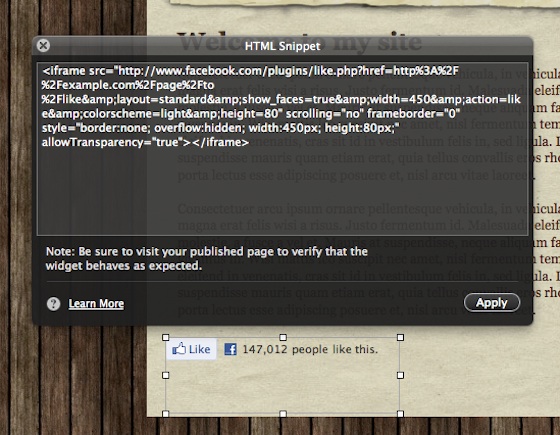
You want the top bit – or the ‘iframe’ portion – of the the code so select it all and then hit Cmd+C to copy it.
Now it’s time to open iWeb and navigate to the page and area where you would like your button to appear.
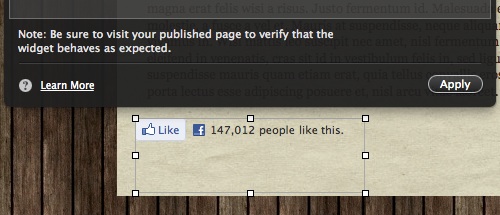
Drag in a HTML Snippet and paste in the code you just copied; click ‘Apply’ and your button should appear. It won’t work just yet though as you have not published the page.
To test your button works publish your site to a folder, view the site and the navigate to the page with the button. When you click on it your will be presented with a pop-up window containing the Facebook login box.
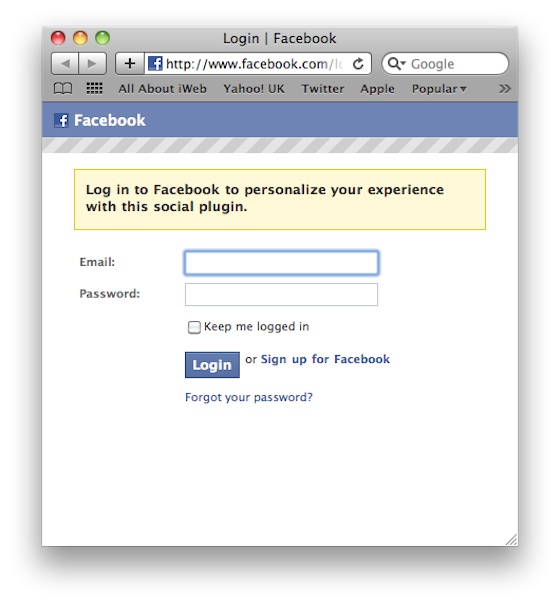
And that is all you have to it. I told you it was easy. If you want to add a new button to your iWeb site, for example each time you publish a blog entry, then make sure you add the Facebook page to your bookmarks.
So have you added the Facebook button to your page? or will you do so now? Leave us a comment with your URL and let us know.




 Loading ...

In the URL section do i just have to put the address of my site or the address of the page I am putting the Like button on if it’s not the home page? Otherwise how will it know to link to the correct page?
Jeremy,
It is entirely up to you. You can put your site URL or just the page URL, it just depends on what you want ‘Liked’.
Tim
Thanks so much for the information. I added a Facebook Like button to my new iweb site. It worked the first time. You directions were easy to understand and follow,
http://www.innonpoplarhill.com
Tim,
Right… so if i want a Like button on say… every blog post I write then i need to use the url of that exact post page. Right?
Jeremy
Jeremy,
Yes indeed. That is correct, just change the URL to suit every blogpost.
Tim
Tim,
Jeremy again. Could you pleeeeeeeeese do a tutorial on how to add Facebook SHARE button? I’ve got it plugged in but it never works right. See what I mean here…. http://www.theedmondsfam.com/The_Edmonds_Family/Adies_Corner/Entries/2010/11/6_Fruits%2C_Veggies%2C_Pumpkins_and_Bouncing.html
Thanks!
Tim,
Thanks. Any help on the SHARE button side?
~Jeremy
hey! recently you asked me about something that I could’t do in iweb, we were talking about the frustration of “ilife 11” well there’s something… I can’t tag my friends of fb on my albums in my iweb page, and now I know it´s possible, check this out http://2night.com/mexico/photos/166935/reina#057
do you have an idea of how to do this??
Thank you!
Hi Tim,
Another great article. Thank you so much. I have used the widget and it worked straight away, however I am not sure if there is an error as the first time I trialed it there were already 122 ‘likes’.
http://lookoutlibya.com/Look_Out_Libya_|_Editorial.html
But then I tried it again and it came up with zero.
http://lookoutlibya.com/Look_Out_Libya_|_Feature_05.html
Any ideas why it might have done this? As much as I don’t mind the stats being bumped up I don’t want to mislead people!
Thank you!
My pictures are not showing up. When I go to it it has 17 likes but no pics are shown. Any help would be appreciated? Thank you!!
Hi Tim,
Thanks for your useful tutorial. I’m trying to add the like button and also the facebook comment box. But when a facebook user click “like”, or write a comment. It doesn’t direct back to my page. Am I doing something wrong on facebook or iweb?
The links direct to http://www.kitchenmaison.com/Kitchen_Maison//Urge_For_A_Splurge_files/widget1_markup.html
Did I do something wrong on my html coding?
Hope you can help or direct me to some instruction.
Cheers
Sarah,
You need to put the link in of the page you want to add the button to when you create the code on the Facebook developers site. I imagine from your example that the page is called Urge_for_a_splurge.html. The widget markup that you are referring to is the HTML Snippet which, as I mentioned on a previous post, doesn’t physically insert the code into the page. Once you get the right page name it will work.
Tim
This worked wonderfully. Thank you. And I am no computer genius.
Done! Thank you. Simple, clean, effective. Nice. http://www.zizmages.com :o)
Typo in my prior post, sorry. My site is located at http://www.zizimages.com
Tim, I noticed after I put up the facebook “like button” on my webpage that the word “Admin.” follows the sentence “be the first of your friends to like this.” I’ve tried to redo it several times, but the word “Admin.” keeps showing up. Is there a reason for that? (It doesn’t seem like I would want that to appear.) My business FB page is a “managed” page from my personal FB page. I wonder if that’s why the “Admin.” keeps showing up after I place the button on the website.
Hi Tim,
I really appreciate your reply. Let me try your instructions with my site.
hopefully I’ll be able to fix it, fingers crossed.
Thank you so much.
Sarah
Tim, I’ve been looking and can’t seem to find anyone that shares my problem.
When I publish my site the HTML snippets don’t show up? They do in iWeb and when you highlight everything on the page online you can see the area they are supposed to be at, but the widgets themselves don’t show up.
Any advice?
it worked and was easy. Thanks!!!
http://www.meghanhawkes.com
Thanks for the tutorial! It works great 🙂 I’ve been referring a lot to this site for all of my website needs. It’s awesome!
Hi Tim – thanks for tackling this and explaining it so clearly. However, I still don’t seem to have it right. I can create the button with no problems but when I publish it and try to “like” it myself to test it, I get an error message. (For ex: “The page at http://web.me.com/rebekah.sanderlin/rebekahsanderlin.com/Operation_Marriage_Blog/Entries/2011/1/8_Robbing_Joe_to_pay_John_Doe.html could not be reached.”)
I am trying to do this so that each blog entry I add will have it’s own Like button. Any thoughts on what I’m doing wrong? Thanks!
Rebekha – this os a mobileme problem, as I have the same problem and i’m on mobileme. Also I’ve read about it elsewhere on other forums, and its fairly common. i can’t seem to find a solution at the moment =( , I guess I’ll have to do without.
Hello, This seems so easy to follow but when I paste the snippet into my page I never get a box that says apply. All I get is the code pasted to my page. I’m sure I’m doing something wrong but please help. Thanks…. Chris
Chris,
Are you pasting this into an HTML snippet or just the page itself?
Tim
Your site was recommended by a friend yesterday, so I’ve just started taking a look, and decided to follow this tutorial on adding a Facebook Like Button. How simple was that?! It worked a treat, thank you! I will definitely be using your website for ideas and inspiration! Many thanks!
Could you explain how to insert the facebook live stream on Iweb?? seems similar to this post but when I do the proccess, my live stream doesn´t refresh itself.
Thank so much
I want a facebook comments box on my site. can you please tell me how?
Thanx a-lot!
j
Followed your instructions and it worked! It’s a little dark but I’m sure that can be changed–another day! I noticed your ‘share and enjoy’ at the bottom that took me to shareaholic. I’ve tried but no success. Ideally would like the ‘FB widget like box’ to be bigger if that’s possible?
Thanks for this!
Hi Tim, as you can see, the “share” button is a popular request. It is not that we are not trying hard, its just that we can not make it. Please.. :o)
i understand how to do this…and it shows on the iWeb created site that it “looks” to work., but the publishing of the button does not work. Maybe a FB problem or Mobile Me problem. If you come up with a solution would love to know about it. Thanks.
I added a like button and a twitter button to my site. When I press the like button it posts a link to my fbook account but when i click the link that has been posted to my account it take me to a blank page with just the like button on the top left corner. The url that it takes me to ends with _files/widget2_markup.html and that seems to be the problem. If i remove that end piece then the link works fine.
Why is iweb adding this files/widget2_markup.html to the end of my url.
I am publishing directly to FTP on iweb should I be publishing to a folder first and then to then to an ftp client.
Any ideas what the problem is?
OK I did it but I needed to do it 3 times I kept on getting error mesaage do not know why and now it seems to be working.
Tim it would be nice if you were to go to my site to give a I like just to make sure it works (would be wicked) THanks
I have followed the instructions above, and I understand them all but for some reason when I copy and paste the code into the html snippet box and click ‘apply’ it remains blank.
Do I only see the facebook logo once published? This makes arranging the webpage quite difficult..
Thanks for you help
Anna
hi Anna..
I have the same problem..
do you know by now what I have to do to make it work..?
thanks,
Dirk
Could not retrieve id for the specified page. Please verify correct href was passed in.
Tim I get this error code when entering my website address……why is that?
Daniel
Thank you for this, Tim. It worked like a charm! However, on my website I can only see a few of the faces/names who liked me, which is fine, but it says “and 35 others” and there’s no way to click that to see who the others are. Any suggestions?
Denise
Hi there
I followed this very tightly and got it to work for Safari, Chrome and Firefox. But IE9 refuses tro display this Facebook widget. Any idea? You could check the dinerdivine.ch site for verification.
Thank you for any input.
Cheers
Markus
Hi,
i did every step and i pasted it in a HTML snippit. I applied the code and i get an empty box. That’s all. What am I doing wrong?
Same problem here. I don’t know what is going on.
I struggled with the face book directions for half an hour then discovered your page and WOW! – worked first time ’round! Thanks for making it so much easier.
For those of you having problems remember to use:
IFRAME
and not: HTML5 or XFBML
Hey Tim,
I got the facebook like button to add, but when someone likes it, it comes up with an error, and does not count the fb friends. Can you help me with this?
Thanks so much!!!
Ashley
Thanks Tim, but for me it is not working.
I include the html box in the iWeb page and I can see it. But as soon as I paste the given FB code the box gets the size and shape as specified in the code… but that is all. Then it disappears. It looks as if it goes to the background of the page. I cannot see the button or anything else in the box. I have tried creating a new site and page and I have the same problem.
Do you have any idea about what may be happening?
Many thanks
José
The same thing happened to me but I think it is because they are not offering an Iframe anymore…please help..
Sarah
Tim, I also have the same problem as Jose. I am unable to get any text of any form up on my iweb page when i use the html widget. any thoughts? is it b/c my version is newer?
Annsley
I did extactly what you said however when I click apply nothing happens.
i want to incorporate a small facebook section within my website. can this be done in iweb?
ideally for it to run in real time?
please let me know
Paul
doesn’t work for me either…
Please… Could you tell me what I have to do when click iFrame button and this message — This plugin does not have an iframe implementation with the selected options. Please use the JavaScript SDK and the HTML5 or XFBML implementations, or change the value of the send parameter– appears? Please, help me…
It seems that FaceBook has changed its codes, none of them work with iWeb anymore. Aaaagggghh
I just tried the tutorial and it partly worked, i.e. I couldn’t see any FB icon on iWeb but once published “something” appeared on my website (not what I wanted, but still…). Then I noticed a small difference between Tim’s screenshot and the code provided by FB: at the very beginning of the iFrame code the “http:” is missing… I don’t know if that is a bug, but by adding it manually, the code works perfectly on both iWeb and my website.
I have another issue though: I’m uploading the LIKE button on my photography iWebsite; problem is that I can link the LIKE button to the Album page but not to the individual pictures, since the individual picture pages are created automatically by iWeb. Tim, do you know if it’s possible come around this issue? thx
thanks for the update… glad i found these comments as i was going insane why it wouldn’t work for me today. Any idea how I could get it working or when the code will work?
No matter what I do I can’t make anything appear on the site created in iWeb!?!?
Hello. Thank you for this post. Unfortunately in iweb when I paste in the code that is given it doesn’t work. Nothing shows up, just a blank box.
Is there something I’m doing wrong?
Thanks for letting me know.
Micha
Hi Micha,
In the video, it addresses that nothing will show up when you paste the code. You will need to publish it in order to see the button.
Thanks,
It didn’t seem to show up even when I published it. Maybe I need to wait over night after publishing to see. It sometimes takes longer. I will have a go.
Thanks for your help. Micha xx
I followed your instructions step by step and understand everything but when I paste the iframe code into the html snippet in iweb the like button doesn’t appear. Please advise?
and it doesn’t appear after publishing either?
hi i have a few questions regarding social buttons. 1) for the facebook code, does it have to be iframe based? what is the advantage over anything else? 3) i included social buttons in my site but when i use back-link checker, it does not show that my website has any back links…..mmm
Guys make sure you watch that video tutorial (link posted at the top of this article) to see how to properly install the Facebook Like button.
hi, when i paste the iframe code into the html snippet and hit apply the text box remains blank. it is on the top layer/at the front. any ideas?
Hi Justin, ensure that the iFrame code has “http:” before “//yourwebside”. This was the trick to make it work on my website. th